Issue
When using the Twilio Voice API you may encounter issues retrieving call logs with specific query parameters, especially when using SIP endpoints with special characters. The cURL command may not filter the data correctly, resulting in unexpected or random information.
Product
Twilio Programmable Voice
Cause
The issue arises due to special characters in the SIP endpoint, such as semicolons, which can interfere with the proper retrieval of call logs. These characters need to be encoded to ensure the API processes the request correctly.
Resolution
To resolve the issue, follow these steps:
-
Identify the SIP Endpoint: Determine the SIP endpoint causing the issue, e.g.,
sip:+1XXXXXXXXXX@h1-sip.XXXXX.com;transport=tls. -
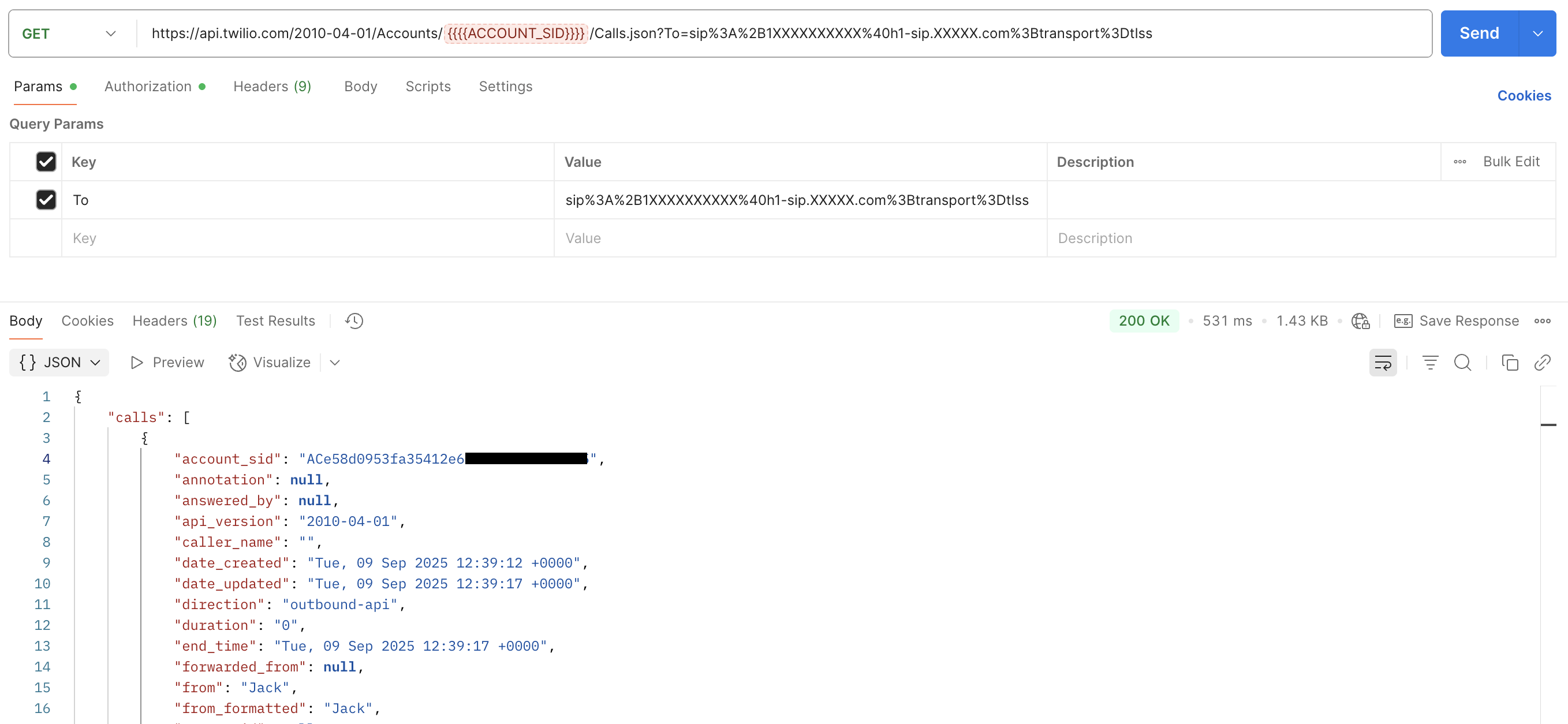
Encode the SIP Endpoint: Use a URL encoding tool to encode the special characters in the SIP endpoint. For example, encode the endpoint to
sip%3A%2B1XXXXXXXXXX%40h1-sip.XXXXX.com%3Btransport%3Dtlss. - Update the cURL Command: Replace the original SIP endpoint in your cURL command with the encoded version.
- Test the Command: Run the updated cURL command to verify that the call logs are retrieved correctly.
Additional Information
More details are outlined here.